The Phomemo M110 Label Printer review comes down to a simple question: do you need a compact printer for varied, small-format labels?
Its Bluetooth app workflow, batch printing, and three included label sizes suit small businesses, campus projects, and home organization.
Phomemo M110 Review Summary
The quick verdict
1,000+ ratings
Read Amazon ReviewsPhomemo M110 Label Printer
A useful fit for small businesses and home organizers who want portable, app-designed thermal labels in several practical sizes.
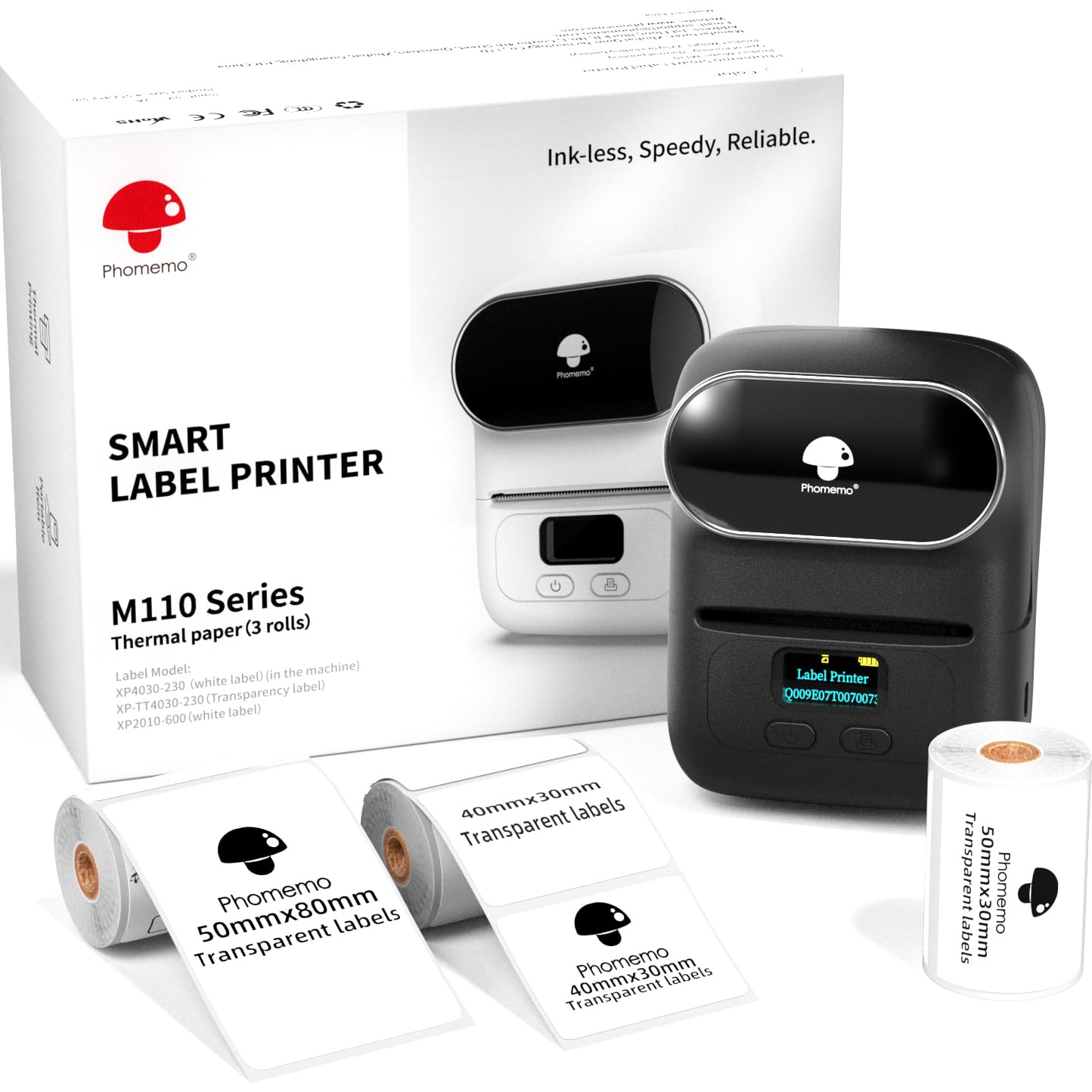
- Includes the M110 printer and three label sizes: 40 × 30 mm, 50 × 30 mm, and 50 × 80 mm. One roll is already inside the printer.
- Prints labels from 20 to 50 mm wide and up to 80 mm long.
- Supports text, pictures, QR codes, and barcodes, along with product, address, ingredient, price, clothing, and jewelry label designs.
- Uses Bluetooth with the Print Master app for phone-based editing, templates, saved custom designs, and batch printing.

Pros
- Three included label formats make it easier to try different small-label uses before choosing a regular format.
- The width and length range covers a variety of compact business, office, and household labeling tasks.
Consider before buying
- The Bluetooth connection must be started from the Print Master app rather than the phone or tablet’s Bluetooth settings, so the setup process has a specific sequence to follow.
- The maximum label dimensions are 50 mm wide and 80 mm long, so buyers should compare those limits with the space their labels need.
Read the full review summary
The M110 combines a portable thermal printer with an app for designing and printing text, pictures, barcodes, and QR codes.
The supplied set includes three label sizes—40 × 30 mm, 50 × 30 mm, and 50 × 80 mm—giving buyers a chance to try different formats for product, address, ingredient, or price labels.
Its strongest appeal is flexibility in a compact format: labels can be up to 50 mm wide and 80 mm long, and the app supports saved templates and batch jobs.
It is best suited to people who can work from a phone or tablet and want short or repeated runs of small labels.
A key setup detail is that Bluetooth pairing happens inside the Print Master app, not through the device’s Bluetooth settings.
The buying factors
Phomemo M110 Scorecard
Editorial scores reflect listed features and buyer fit; they are not laboratory measurements or customer ratings.
Label size flexibility
The printer accepts widths from 20 to 50 mm and lengths up to 80 mm, with three sizes included in the set.
Label design options
Print Master offers templates, saved custom designs, more than 30 fonts, 500+ emojis, and 40+ borders.
Batch printing
Batch printing is supported, and the described speed is 1.2 inches per second.
Portability
The M110 is presented as a mini portable printer, with up to four hours of continuous working time.
Setup clarity
The app-based connection is straightforward once understood, but pairing directly in the device’s Bluetooth settings can fail.
Small-business versatility
Supported label types include product, barcode, address, ingredient, price, clothing, and jewelry labels.
Key Features and Specifications of Phomemo M110
- Includes the M110 printer and three label sizes: 40 × 30 mm, 50 × 30 mm, and 50 × 80 mm. One roll is already inside the printer.
- Prints labels from 20 to 50 mm wide and up to 80 mm long.
- Supports text, pictures, QR codes, and barcodes, along with product, address, ingredient, price, clothing, and jewelry label designs.
- Uses Bluetooth with the Print Master app for phone-based editing, templates, saved custom designs, and batch printing.
- The app includes more than 30 fonts, 500+ emojis, and 40+ borders.
- Thermal printing is described as running at 1.2 inches per second, with up to four hours of continuous working time.
- OCR can recognize text in an image and convert it into editable text; the described recognition time is four seconds.
Pros and Cons of Phomemo M110
Pros
- Three included label formats make it easier to try different small-label uses before choosing a regular format.
- The width and length range covers a variety of compact business, office, and household labeling tasks.
- Batch printing and saved templates can help with recurring labels, such as product or ingredient identification.
- The app supports several design elements and content types, including barcodes, QR codes, and OCR.
Consider before buying
- The Bluetooth connection must be started from the Print Master app rather than the phone or tablet’s Bluetooth settings, so the setup process has a specific sequence to follow.
- The maximum label dimensions are 50 mm wide and 80 mm long, so buyers should compare those limits with the space their labels need.
- The described workflow centers on a phone or tablet app; check that this approach fits your preferred device and label-design routine before choosing it.
Who Should Buy Phomemo M110?
Good fit
Consider the M110 if you make small product, ingredient, price, clothing, or jewelry labels and want a portable printer that can handle several compact formats.
The included sizes offer a practical way to see which dimensions work for your containers, packages, or display items.
It also makes sense for recurring label work. Batch printing, saved templates, and the range of text and code options can reduce repetitive layout work when you need groups of similar labels.
The app’s OCR feature may help when you are turning text in an image into editable copy.
Before buying, map your typical label dimensions against the 20–50 mm width range and 80 mm maximum length. Plan to pair through Print Master, with Bluetooth enabled, rather than through the device’s general Bluetooth menu.
Who should skip it
Look elsewhere if your work routinely requires labels wider than 50 mm or longer than 80 mm. The M110’s documented size range is aimed at compact labels.
It may be a poor match if you need a workflow that avoids app-based Bluetooth setup. Check that Print Master and its connection steps suit the device you plan to use.
How the Phomemo M110 Fits Small-Label Work
Three label sizes to try
The included 40 × 30 mm, 50 × 30 mm, and 50 × 80 mm formats give the printer a useful starting range for different compact labeling jobs.
Trying them can help a small seller or organizer settle on dimensions before building a routine around one format. The maximum label length is 80 mm, so check the actual space available on products or containers first.
App design and connection
Print Master is central to both setup and label creation. Its templates, saved designs, fonts, emojis, and borders provide options for making labels recognizable across a small product range or personal organization system.
The Bluetooth pairing instruction matters: start the connection in the app after turning Bluetooth on, rather than pairing from the device settings.
Batch jobs and repeat use
Batch printing is useful when several items need similar labels, while saved templates can cut down on repeated design work.
The stated printing speed is 1.2 inches per second, and the printer is described as supporting up to four hours of continuous work.
Those details make it worth considering for periodic labeling sessions; buyers with a specific volume should match their expected batches to the label size and app workflow.
OCR for turning image text into labels
The OCR feature is designed to recognize text from an image and make it editable for a label.
That can be convenient when the source wording is already in a photo, though buyers should expect to review the converted text before printing, especially for names, numbers, or other details where accuracy matters.
Alternatives to Phomemo M110
Desktop Label Printers alternative

700+ ratings
Read Amazon ReviewsPhomemo M220 Label Maker
Choose between them by matching label width and device workflow to your needs: the M110 is suited to compact formats and includes three sizes, while the M220 accommodates wider labels and offers a USB computer connection.
The M220 does not support 4 × 6 shipping labels.
- The M220 supports label widths from 0.78 to 3.14 inches, Bluetooth for phones and tablets, and USB connections for computers.
- It also uses Print Master and is described as supporting batch printing, OCR, barcodes, and QR codes.
- The M110 prints labels up to 50 mm wide and 80 mm long, and its described workflow centers on Bluetooth and the Print Master app.
Desktop Label Printers alternative

28,000+ ratings
Read Amazon ReviewsPhomemo D30 Label Maker
The M110 is the more relevant fit for buyers whose work includes larger compact product labels or its three included formats.
Consider the D30 if continuous tape or the included white, gold, and clear label options better match home, school, or small-business labeling.
- The D30 supports continuous label tape and fixed-length labels, with white, gold, and clear tapes included.
- Its monochrome output uses colored label tape for color-patterned designs, and the app includes templates, symbols, frames, and barcode and QR code tools.
- The M110 focuses on labels up to 50 mm wide and 80 mm long, including product and barcode formats, and comes with three label sizes.
Is Phomemo M110 Worth It?
The Phomemo M110 Label Printer is worth considering for small businesses, campus projects, and home organizers who need varied, compact labels and are comfortable creating them in a phone app.
Its three included sizes, batch printing, and mix of text, image, barcode, and QR code options make it adaptable to recurring small-label tasks.
Check the 50 mm width and 80 mm length limits against your intended labels, and follow the app-based Bluetooth pairing steps.
If those dimensions and that workflow fit, the M110 is a practical portable choice; if your labels need more room or your setup depends on a different connection method, compare a model designed for that use.
Your review at a glance
1,000+ ratings
Read Amazon ReviewsPhomemo M110 Label Printer
A useful fit for small businesses and home organizers who want portable, app-designed thermal labels in several practical sizes.
- Includes the M110 printer and three label sizes: 40 × 30 mm, 50 × 30 mm, and 50 × 80 mm. One roll is already inside the printer.
- Prints labels from 20 to 50 mm wide and up to 80 mm long.
- Supports text, pictures, QR codes, and barcodes, along with product, address, ingredient, price, clothing, and jewelry label designs.
- Uses Bluetooth with the Print Master app for phone-based editing, templates, saved custom designs, and batch printing.